Database MCP Servers for AI Coding Agents
TL;DR: A database MCP server connects an AI coding agent to data over the Model Context Protocol. There are two kinds: servers that attach to a database you already run (Postgres, MongoDB, Supabase), and servers that provision a fresh backend for the agent (MoonDB). This post compares both and shows how to provision one in two calls.
Your agent can write a React component in seconds. Then it asks where the data goes, and the flow stalls. A database MCP server closes that gap: it hands the agent a set of tools for working with data, so the model can read schemas, run queries, and persist rows on its own.
The catch is that "database MCP server" covers two very different products. One group plugs into a database you're already running. The other creates the whole backend so the agent has somewhere to put data in the first place. Pick the wrong one and you'll redo the setup, so this guide draws the line clearly.
What a database MCP server does
The Model Context Protocol is an open standard that lets AI clients call external tools through a common interface. Cursor, Claude Code, and Windsurf all speak it. An MCP server publishes a list of tools, and the agent calls them with structured arguments and reads structured results back.
A database MCP server publishes database tools. Instead of pasting a connection string into a prompt and hoping the model writes correct SQL, you register the server once. After that the agent has named actions like "list tables", "run query", or "insert row", and it uses them the way a developer uses a CLI. The model stops guessing about your data and starts asking the source directly.
That's the shared idea. What differs is whether the server assumes a database exists.
Two kinds: connect to a database, or provision a backend
Connect to a database you already run
Most database MCP servers are connectors. You already operate Postgres, MongoDB, or a Supabase project, and the server gives an agent a window into it.
- The MongoDB MCP Server connects Atlas, Community, or Enterprise deployments and exposes querying, indexing, and admin tools.
- The Supabase MCP Server reaches across one platform: Postgres tables, auth, storage, and edge functions for projects you've already created.
- For plain Postgres there are several options, including Postgres MCP Pro, which adds index tuning and health checks on top of read and write access.
Connectors are the right call when the data already lives somewhere and you want the agent to reason over it. Adding analytics to a production app, debugging a slow query, generating a migration against a real schema: a connector fits all of these.
One thing to watch with this group is access scope. You're pointing a model at a live database, so the server's permission model is doing real work. Anthropic's original reference Postgres MCP server was archived in May 2025, and the maintained options have moved on since, so check how a connector scopes access and sanitizes writes before you trust it with production rows.
Provision a backend the agent owns
The second kind starts from nothing. There's no database yet, because creating one is the point.
MoonDB's MCP server works this way. The agent calls create_project, then set_schema with a JSON description of the tables it wants, and a REST API, authentication, and file storage come online behind that project. The model didn't connect to a backend. It provisioned one.
This fits the situation most coding agents are actually in. When Cursor or Claude Code scaffolds an app from a prompt, the frontend appears first and the backend is a blank space. A provision-style server lets the agent fill that space without you stopping to set up a database, write migrations, or deploy anything.
Connect-style vs provision-style at a glance
| Connect-style (Postgres, MongoDB, Supabase) | Provision-style (MoonDB) | |
|---|---|---|
| What it does | Talks to a database you already run | Creates a new backend for the agent |
| Needs an existing database | Yes | No |
| Auth and file storage | None for Postgres/Mongo; Supabase includes both | Built in |
| Hosting | You run the database | Runs on the Cloudflare edge |
| Schema changes | SQL or migrations against your database | Declarative JSON schema, auto-migrated |
| Best for | Adding AI to an existing app's data | Standing up a backend from a prompt |
Neither column is better in the abstract. They answer different questions. "Let my agent work with the data I have" points left. "Let my agent give this app a backend" points right.
Provisioning a backend over MCP, step by step
Here's how the provision-style flow works with MoonDB. The setup is one config entry per editor.
# Claude Code — one-time, per project or per user
claude mcp add --transport http \
  moondb https://moondb.ai/mcp \
  --header "X-API-Key: mk_..."
After that, the agent has 14 tools covering the project lifecycle: create_project, set_schema, query, insert, update_row, delete_row, and the rest for keys and AI calls. The server also returns an initialize.instructions primer on connect, so the model already knows MoonDB's conventions (IDs are UUIDs, every error carries a suggestion field to retry against, schemas are declarative JSON) before its first call, instead of stopping to ask how the API is shaped.
The two calls that do the heavy lifting are project creation and schema. Under the hood they map to plain REST, which is handy to see even if your agent never shows it to you. First, the project:
curl -X POST https://moondb.ai/v1/projects \
  -H "X-API-Key: mk_..." \
  -H "Content-Type: application/json" \
  -d '{ "name": "tasks-app" }'
Then the schema. You describe tables as JSON, and MoonDB compiles it to SQL, applies the migration, and turns on the matching endpoints:
{
  "tables": {
    "tasks": {
      "columns": {
        "title": "string required max_length 200",
        "done": "bool default false",
        "due_date": "date"
      }
    }
  }
}
curl -X PUT https://moondb.ai/p/{project_id}/v1/schema \
  -H "X-Admin-Key: sk_..." \
  -H "Content-Type: application/json" \
  -d '{"tables":{"tasks":{"columns":{"title":"string required max_length 200","done":"bool default false","due_date":"date"}}}}'
The REST API is live the moment that PUT returns. The agent can write a row right away:
curl -X POST https://moondb.ai/p/{project_id}/api/tasks \
  -H "X-Admin-Key: sk_..." \
  -H "Content-Type: application/json" \
  -d '{ "title": "Ship the MCP post" }'
In the dashboard, the same project shows its live URL, keys, and a copy-paste request, which is useful when you want to check what the agent stood up:
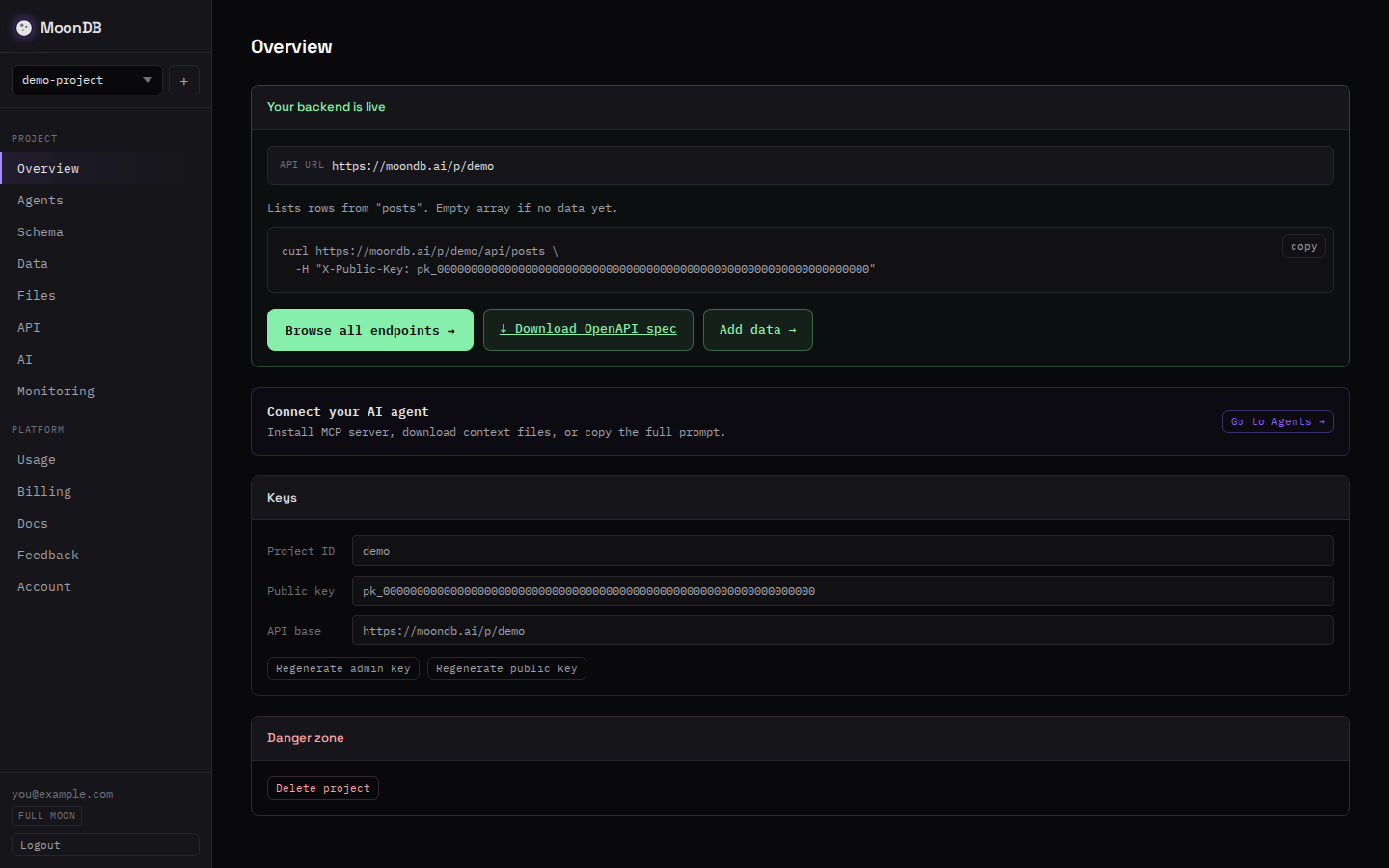
For the full REST walkthrough without MCP in the picture, the companion post on how to generate a REST API from a JSON schema covers the same flow with curl.
When to reach for which
Pick a connector when the data is the fixed point. You have a Postgres instance, an Atlas cluster, or a Supabase project in production, and you want the agent to query and edit it. Keep the access scope tight and read-only where you can.
Pick a provision-style server when the app is the fixed point and the backend is still missing. Vibe-coding a tool in Cursor or Claude Code, prototyping a side project, or building something that has no database yet: the agent creates the backend instead of waiting on you to provision one. If you've been reaching for a Supabase project just to give an agent somewhere to write data, a provision-style server skips that setup.
Some teams use both. A connector against the production database for analysis, and a provision-style server for the new feature the agent is prototyping on the side.
The honest limits
MoonDB runs on Cloudflare D1, which is SQLite under the hood. That means a single writer per database and a 10 GB ceiling per project. It's a strong fit for the apps coding agents tend to build, and it isn't a drop-in for a high-write Postgres cluster. If your workload needs multi-writer concurrency at scale, a connector against your own database is the better tool.
The reverse limit is just as real. A connector gives an agent a view into a database and nothing else. Auth, file storage, hosting, and the HTTP layer are still yours to build and run. A provision-style server includes those, which is the whole reason it exists. Match the tool to whether you're missing data access or missing a backend. The docs cover MoonDB's schema format, access rules, and API in detail.
FAQ
What is a database MCP server?
A database MCP server is a small program that exposes database actions to an AI agent over the Model Context Protocol. Once it's configured in Cursor, Claude Code, or Windsurf, the agent can inspect schemas, run queries, and change rows by calling tools instead of you writing SQL by hand.
Do I need an existing database to use an MCP server?
It depends on the type. Connect-style servers (Postgres, MongoDB, Supabase) attach to a database you already run. Provision-style servers like MoonDB create the database, REST API, auth, and file storage for you, so an agent can stand up a backend from nothing.
Can a coding agent create a backend over MCP?
Yes, if the server supports it. MoonDB's MCP server gives the agent create_project and set_schema tools, so it can spin up a project, apply a schema, and get a live REST API in two calls. Most database MCP servers only talk to a database you set up first.
Is it safe to give an AI agent database access over MCP?
Treat the key like any credential. Scope it to what the agent needs, keep production keys out of shared config files, and prefer read-only or per-table access. Some early MCP servers shipped weak SQL sanitization, so check that writes are parameterized before pointing one at real data.
Sources
- Model Context Protocol
- MongoDB MCP Server docs
- Supabase MCP Server docs
- Postgres MCP Pro (crystaldba/postgres-mcp)
- MoonDB MCP server